


Utility bills can be easily managed in the digital age. In the United Arab Emirates, people can check their electricity and water bills on-line. No need to go to the office or wait in long lines. Mobile apps and websites provide easy access. Bills can be viewed anywhere and anytime. Bill checking is now fast, easy, and convenient.
Federal Electricity and Water Authority (FEWA) provided water and electricity services in many emirates. Etihad Electricity and Water operates now. People still search online for “FEWA Bill Check“. This guide explains step-by-step how to check your FEWA invoice. This guide includes all the necessary details, such as customer ID and account numbers, online payment options and tips on how to manage your utility bill efficiently.
What is (FEWA) / Etihad Water and Electricity?
FEWA is a state-owned utility in the United Arab Emirates. It provides electricity and water to residents of the Northern Emirates.
The UAE’s commitment towards modernization and smart services is reflected in the transformation of FEWA into EtihadWE. The goal is to offer customers a seamless and user-friendly experience on the digital front.
Key Responsibilities
- Electricity supply to commercial and residential users
- Water services that are reliable and clean
- Manage billing systems and customer account
- Online services like bill payment and inquiry are available.
- Supporting sustainable water and energy consumption
EtihadWE is a key player in the maintenance of infrastructure and providing uninterrupted service across many regions.
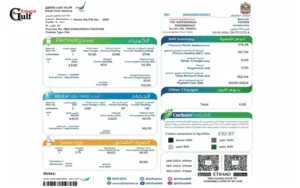
Etihad Water and Electricity covers the following areas:
EtihadWE is a company that primarily services the Northern Emirates. It manages water and electricity distribution.
- Ras Al Khaimah
- Ajman
- Umm Al Quwain
- Fujairah
EtihadWE is a service that residents in these emirates depend on heavily. Online bill checking has become a part of everyday life.
Electricity and water charges sample monthly FEWA bill
| Bill Component | Unit Consumed | Rate (AED/unit | Amount (AED). |
| Electricity – Tier 1 | 350 kWh | 0.23 | 80.50 |
| Electricity – Tier 2 | 150 kWh | 0.29 | 43.50 |
| Water – Tier 1 | 50 m3 | 1.50 | 75.00 |
| Water – Tier 2 | 20 m3 | 2.00 | 40.00 |
| Service Charges | – | – | 20.00 |
| VAT (5%) | – | – | 13.95 |
| The Total | 272.95 |
It’s not just convenient to check your FEWA Bill Check on the web, but it also improves financial management and resource tracking.
Online Bill Checking is Important
- Instant access to your bill
- Transparency – Know your charges and consumption
- Save time by avoiding physical offices
- Accessibility: Available anywhere, anytime
- Environmental sustainability is supported by a paperless system
- Online systems allow users to manage their accounts completely online.
- How to check FEWA bill online
You can check your FEWA invoice online in several ways. Each method is easy to use.
Method 1: Using the Official Site
Checking your bill on the official EtihadWE site is the best way to be sure.
Steps:
- Visit the official Etihad Electricity and Water website
- Login or navigate to “Bill Inquiry”.
- Enter your Customer ID Number or Account Number
- Your dashboard is now available
- View your current billing and billing history
This method is ideal for users who would prefer to access services via a laptop or computer.
Method 2: Using the Mobile Application
EtihadWE’s mobile app allows you to quickly access billing information.
Steps:
- Download the EtihadWE App from your device’s application store
- Register your details to log in
- Open the billing section
- View your latest bill
- Pay directly via the app
Users who need instant access to their smartphone can use the mobile app.
Method 3 – Quick bill Check without Login
Quick bill check is an option for users who prefer a quicker solution.
Steps:
- Visit the official website
- Choose the option for quick payment or bill inquiry
- Enter your account number
- View your outstanding bill
This method is ideal for quick checks and eliminates the need to login credentials.
Quick Payment Summary Table FEWA QuickPay
| Payment Method | Transaction Limit (AED) | Processing Time |
| Card Debit/Credit | 50,000 | Instantly |
| Online Banking | 100,000 | Instantly |
| Mobile Wallets | 5,000 | Instantly |
| Standing Instruction / Auto Debit | N/A | Monthly |
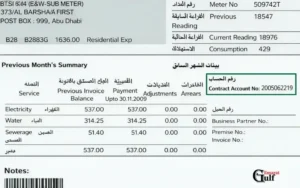
Details required for FEWA bill check
You will need to enter specific account information in order to access your invoice.
Essential Information
- Customer ID
- Account Number
- Register Mobile Number
- Email Address (optional).
These details will ensure a hassle-free and smooth process.
How to pay FEWA bill online
Online payment is convenient and secure. There are multiple payment options to suit the needs of different users.
Payment Methods
- Debit cards and credit cards
- Online Banking
- Mobile wallets
- Setup of automatic payment
How to pay your bill
- Login to your EtihadWE Account
- Choose your bill
- Select a payment option
- Confirm your transaction
- Confirmation of payment
Online payments can help you avoid late fees, and maintain uninterrupted service.
How to download and print FEWA bill
You can download your bill to keep records and submit proof of payment.
Steps:
- Login to your account
- Billing history
- Choose the bill that you want
- Download the PDF version
- Please print if necessary
This feature is particularly useful for business owners and tenants.
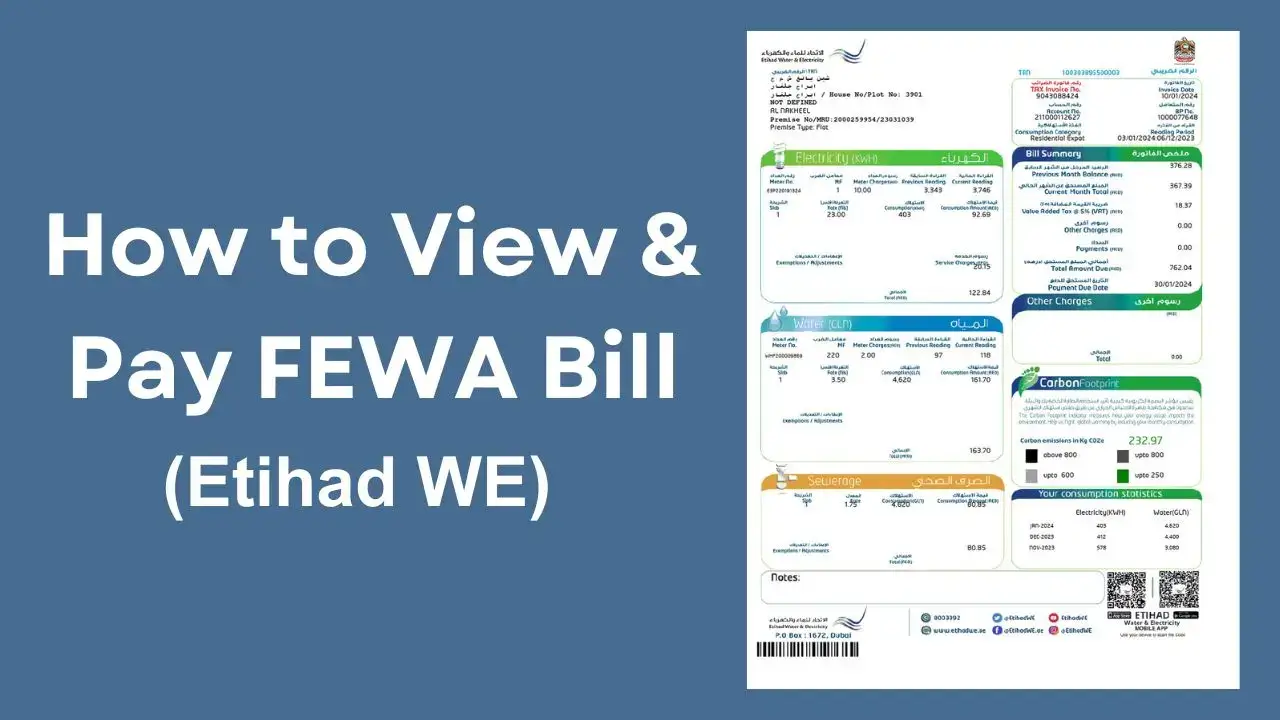
Understanding Your FEWA Bill
Understanding your bill will help you control your spending and monitor your usage.
Key Components
Electricity Charges
Calculated based on the energy consumption in Kilowatt Hours (kWh).
Water Charges
Calculated based on water consumption levels.
Service Charges
Included in the administrative and maintenance costs
VAT
The UAE has a standard value added tax.
Billing Period
The price usually covers a month’s usage.
By being aware of the components, you can better manage your consumption.
Read Also: Check Nol Card Balance Instantly
How to reduce your FEWA bill
Reduce your water and electricity usage to reduce your monthly costs.
Saving Energy Tips
- Use energy-efficient appliances
- Turn off all lights and devices that are not in use
- Maintaining air conditioning systems
- Use LED lighting
Saving Water Tips
- Repair leaks as soon as possible
- Install water-efficient fixtures
- Use less water
Savings can be made by making small changes to your daily routine.
Common Problems and Solutions for FEWA Bill Check
Although the online system in general is reliable, some users may encounter problems such as incorrect account information, login issues, or technical errors. Most of these issues can be resolved by resetting or verifying your account information, checking your data, and clearing your browser cache.
Contacting customer service can help resolve any issues quickly if the problem persists. FEWA offers dedicated support services for users to help with account-related questions and technical issues.
By ensuring that your account details are accurate and up-to-date, you can avoid many issues and enjoy a seamless experience.
FEWA vs Etihad Water and Electricity
The switch from FEWA (formerly FEWA) to Etihad Electricity and Water brought about several improvements.
The Key Changes
- Digital platforms that are enhanced
- Improved customer experience
- Faster service delivery
- Billing systems integrated
The core services are unchanged despite the new branding.
Utility Bill Management Tips
Managing your FEWA bills effectively requires a pro-active approach. You can stay informed and spot any anomalies by regularly checking your bill. Automatic payments will help you avoid late charges and ensure timely payment.
You can reduce your expenses by monitoring your water and electricity usage. Keep a record of all your payments and bills. This will help you with budgeting and financial planning.
You can enhance your utility management by leveraging the digital tools offered by FEWA.
Future of Digital Utility Services for UAE
Utility services are not an exception. The UAE is a leader in digital transformation. The move from FEWA into Etihad Water and Electricity is part of a larger effort to modernize the infrastructure and improve services.
Users can expect to see more innovations in the future, such as smart meters and AI-driven insights. These innovations will enhance utility management’s efficiency and convenience.
The UAE has a vision to become a leader in digital governance, sustainable development and smart services.
Conclusion:
Etihad Electricity and Water have introduced digital platforms that make it easy to check your FEWA invoice online. You can access your billing details in seconds, whether you use the mobile app, website or quick inquiry.
It is important to manage your utility costs effectively. This includes understanding your bill, tracking your consumption and paying on time. Users can expect more user-friendly and convenient solutions with the continuous development of smart services in the UAE.
This guide will help you to take control of your water and electricity bills and enjoy a seamless digital experience.
FAQ’s
How can I check the FEWA invoice online?
Use the Etihad Water and Electricity mobile app or the website with your Customer ID number or account number.
Can I view my FEWA invoice without logging in to the site?
Enter your account number to use Quick Pay.
Is FEWA active in the UAE today?
FEWA is now Etihad Electricity and Water, but the services are still the same.
How can I check the FEWA invoice?
Customer ID, Account Number, and Registered Mobile Number
How do I pay my FEWA online bill?
Payments are made by credit/debit cards, online banking, mobile wallets or auto debit.
How do I download my FEWA bill?
Download your PDF bill by logging into your account and clicking on the billing history link.
What should I do if the FEWA invoice shows incorrect charges on it?
EtihadWE Customer Support can help you resolve any issues.
How long will it take before my online payment is reflected?
In most cases, payments made via Quick Pay, the website, or app are instant.
How can I set up automatic FEWA payments?
Payments are processed each month automatically if you choose the Auto Debit option.
What can I do if I have problems with FEWA bill checks?
Contact customer service via email, hotline or a local service center.
Disclaimer
The content on Gulf Emarat is provided for general information purposes only. We are not affiliated with any government, bank, or official organization mentioned on this website. We aim to keep information accurate and up to date, but we do not guarantee its completeness or reliability. Users should always confirm details from the official website before taking any action. Gulf Emarat is not responsible for any loss or damage resulting from the use of this information.